Plugin Manager
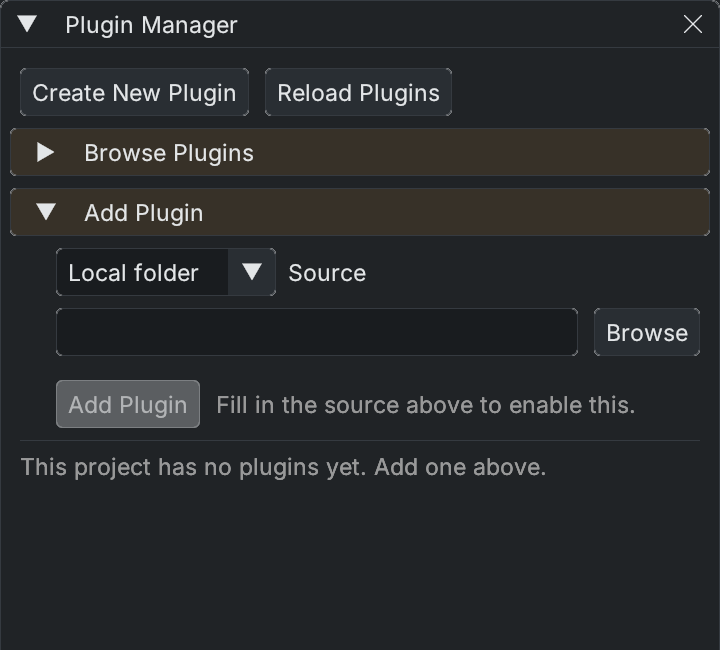
Open Plugins > Plugin Manager with a project open. This window manages that project's plugins; individual plugins can also contribute their own windows or menu items. See the plugin development guide for manifests, packaging and editor extensions.
- Browse Plugins searches the registry. Refresh updates the catalogue; install/update controls show the version being requested. If the registry is unavailable, a cached list may still be shown.
- Add Plugin accepts a Local folder, Git URL with a ref, or Zip URL. A local source checkout runs from your folder and is rebuilt from source; a built package is copied into the plugin cache and pinned.
- Create New Plugin scaffolds a manifest and starter code. Choose gameplay/editor code and a destination, and optionally add it to the current project.
- Installed rows show source, version and status, with applicable Enable/Disable, Update and Remove actions. Check the status messages for installation progress and failures.
LOCAL means the editor resolves the plugin from a local folder. LOCAL ONLY means teammates cannot restore it from the project's declaration; publish/declare it or vendor it into the repository before sharing the project. The manager also reports missing external SDK paths for plugins that require them.
Reload Plugins restarts the editor on the same project because loaded assemblies cannot be replaced in the running process. The editor requests confirmation and saving scene changes when necessary. A rebuilt plugin is not active merely because its source compiled.
Publishing is a separate action from installing or updating. Review the publish plan, version and source-control operations before using the publishing controls.